How to Play RobuxClicker: A Complete Beginner's Guide
At a glance
Start by clicking the coin, then buy your first Avatar. Buildings produce currency automatically; compare the price and extra production before your next purchase.
Continue playing · Prestige and the Beanstalk Tree — RobuxClicker Guide · Best Building and Upgrade Order — RobuxClicker Guide
Implementation checked on 8 September 2026 by the RobuxClicker project maintenance workflow.RobuxClicker is an idle clicker — one of the most relaxing kinds of game there is. You click a giant Robux coin, the number goes up, and you spend what you earn on helpers that keep earning while you do nothing at all. This guide walks a brand-new player through the first session: the click loop, your first buildings, what the numbers mean, how to read the shop, and how the game keeps your progress safe.
The click loop: the heart of the game
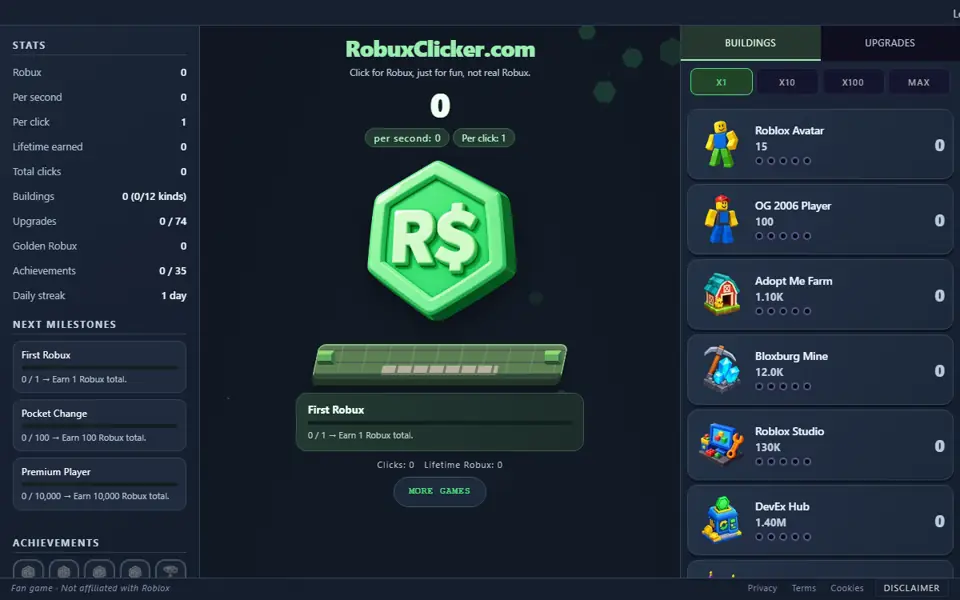
Open the RobuxClicker homepage and you will see one thing you cannot miss: a large green-and-gold Robux coin in the centre of the screen. That coin is the entire game in one object. Every time you click it, you earn Robux — the in-game currency — and a little "+1" floats up from where you clicked.
At the very start, one click is worth exactly 1 Robux. That sounds small, and it is, but it is only the seed. The whole point of an idle clicker is that small numbers grow into enormous ones faster than you expect. Your job in the first minute is simple: click the coin. Click it twenty or thirty times. Watch the counter at the top of the screen climb. There is no timer, no fail state, and nothing you can do wrong — RobuxClicker is a game you cannot lose.
Clicking also has a hidden bit of spice. Every click has a 5% chance to land a critical hit, which pays out seven times the normal amount and throws off a burst of golden sparks. You do not control crits — they simply happen — but once your click power has grown, a lucky crit can be a satisfying jackpot. The first time you see the screen give a tiny shake on a big payout, that is the game's "juice" rewarding you for a good click.
Earning your first Robux and your first building
Clicking by hand is fine for your first handful of Robux, but the real game begins the moment you stop clicking and start hiring. Down the right-hand side of the screen (or under the Shop tab on a phone) is the shop, and the very first item in it is the Roblox Avatar.
The Roblox Avatar costs 15 Robux and produces 0.1 Robux every second on its own — no clicking required. So your first goal is to click the coin until you can afford one Avatar, then buy it. The moment you do, you have made the most important transition in any idle game: you now earn Robux while you are not clicking.
Buying that first Avatar also unlocks an achievement, "First Hire", and it teaches you the shop's golden rule: every copy you buy of a building costs a little more than the last one. Each purchase raises that building's price by 15%, so your second Avatar costs about 17 Robux, the third about 20, and so on. Prices climb steadily but production climbs too — buying more is almost always worth it.
Once you own a few Avatars, the second building, the OG 2006 Player, comes into reach at 100 Robux. It produces a full 1 Robux per second each — ten times an Avatar. This pattern continues through all twelve buildings, from the humble Avatar up to the Time Trials Speedrun: each one costs far more than the last but produces far more too. You do not need to think about the late game yet. For now, just keep buying the cheapest building you can comfortably afford.
What "Robux per second" (RPS) means
Near the top of the game you will see a figure labelled Robux per second, usually shortened to RPS. This is the single most useful number on the screen, and understanding it is what turns a button-masher into a player.
RPS is simply the total amount of Robux all your buildings earn for you automatically every second, added together. One Avatar gives you 0.1 RPS. Ten Avatars give you 1 RPS. Add an OG 2006 Player and that is another 1 RPS on top. The game adds up every building you own and shows you the grand total. If your RPS reads 50, then walking away from the keyboard for one minute earns you about 3,000 Robux without a single click.
Because RPS keeps paying whether or not the tab is focused, the smart way to play an idle game is to grow your RPS as high as you can and then let it work. Hand-clicking matters most in the opening minutes; after that, RPS quietly does the heavy lifting. When you reach 100 RPS you unlock the "Idle Income" achievement — a nice early milestone to aim for. If you want to push idle earnings as far as they go, the Golden Robux and Idle Strategy guide covers the advanced tricks.
Reading the shop
The shop is where you spend everything you earn, and it has three tabs. Knowing what each one does saves you a lot of guesswork.
- Buildings. The twelve auto-generators described above. Each row shows the building's name, its price, how much RPS it produces, and how many you already own. The moment you can afford a building, its row picks up a green border and its price turns green — that highlight is the game's way of signalling "you can buy this now". Buildings still far out of reach stay dimmed until your earnings catch up.
- Upgrades. One-time purchases that make what you already own stronger. There are 74 upgrades in total: 60 building upgrades (each one doubles a single building's output), 10 click upgrades (each one doubles your click power), and 4 synergy upgrades (each click also earns a small percentage of your RPS). Upgrades stay hidden until you qualify for them — a building upgrade appears once you own enough of that building, and a click upgrade appears once you have earned enough Robux in total.
- Beanstalk. The prestige tab. It is empty and locked early on and only becomes useful much later in the game. You can safely ignore it for your first few sessions; when you are ready, the Prestige and the Beanstalk Tree guide explains exactly what it does.
Above the building list are buy-amount buttons: x1, x10, x100 and max. They let you buy several copies of a building in one tap instead of clicking the row over and over. The "max" button buys as many as your current Robux can pay for. Buying in bulk is handy, but be careful — x10 and x100 spend your savings far faster than you might expect, so use them deliberately.
One more tip: hover your mouse over any item — including the locked, greyed-out ones — to see a tooltip with its full details and a line of Roblox-themed flavour text. The tooltips are the quickest way to learn what something does before you commit your Robux. Deciding the smartest order to buy buildings and upgrades in is its own small art; the Best Building and Upgrade Order guide goes deep on it.
The news ticker
Running across the top of the screen is a slim scrolling news ticker. It has no effect on your Robux — it is pure atmosphere — but it is one of the game's nicest touches and worth a glance now and then.
The ticker mixes two kinds of message. Most are short, playful Roblox community headlines, and they react to how far you have come: an early one might read "BREAKING: Mysterious user begins clicking the Robux", while a much later one announces that the Roblox economy now revolves around your decisions. Sprinkled between the headlines are genuine gameplay tips — for example, a reminder that you can hover any item for details, or that buying in bulk spends fast. If a headline scrolls past too quickly to read, do not worry: a fresh one is always along in a moment.
Your first achievements
RobuxClicker has 35 achievements. Achievement notifications are queued so that several unlocks remain readable.
In your first session you will collect a cluster of them almost immediately. "First Click" fires the instant you click the coin once. "First Robux" arrives just as fast. Click a hundred times and you earn "Click Apprentice"; reach 100 Robux total and you earn "Pocket Change"; buy that first Avatar and "First Hire" pops. Keep going and "Premium Player" rewards your first 10,000 Robux earned. None of these need any special effort — they are the game's way of saying "you have got the hang of it".
You can see every achievement, locked and unlocked, in the stats panel, along with next-milestone hints that point you at what to aim for next. A few achievements are deliberately tricky — earning a million Robux without ever buying a click upgrade, for instance — but those are challenges for later. The full set, grouped by theme, is covered in the Achievement Hunting guide.
Saving and exporting your progress
RobuxClicker saves automatically. Roughly every ten seconds the game writes your progress to your browser's own local storage, so if you close the tab and come back later on the same device and browser, your Robux, buildings, upgrades and achievements are all exactly where you left them. There is no account to create and no password to remember.
Because that save lives on your device rather than on a server, it does not automatically follow you to a different computer or phone. That is what the export and import feature is for. Exporting turns your entire save into a single block of text — a base64-encoded string — that you can copy somewhere safe, such as a notes app or an email to yourself. On another device, you simply paste that text into the import box and your whole game is restored. It is also the easiest way to keep a backup before trying something risky, so it is well worth doing once you have made real progress.
A simple plan for your first session
If you would like a clear path to follow, here is a beginner-friendly order of play for your first sitting:
- Click the giant Robux coin until you can afford one Roblox Avatar (15 Robux), then buy it.
- Keep clicking and keep buying more Avatars whenever you can — each one nudges your RPS upward.
- When you reach 100 Robux, start buying the OG 2006 Player as well; watch your RPS figure climb as you do.
- Check the Upgrades tab now and then. As soon as an affordable upgrade appears, buy it — doubling a building or your click power is almost always a great deal.
- Aim for the "Idle Income" achievement at 100 RPS, then simply let the game run. Idle income takes over from here.
- Once you have meaningful progress, export your save and keep the text somewhere safe.
That is genuinely all you need to start. RobuxClicker rewards patience far more than frantic clicking, so feel free to leave the tab open in the background and check in whenever you like.
Where to go next
Once the basics feel comfortable, the rest of the RobuxClicker guides library opens up the deeper game. When your buildings start to feel slow, the prestige guide explains how resetting your run can make you permanently stronger. If you want every Robux to count, the building and upgrade order guide shows you what to buy and when. And whenever you have had your fill of clicking, the RobuxClicker Arcade has six completely different free games waiting.